Table of Contents
- Motivation
- What it does
- Architecture
- Parsing a Claude Code pane
- Streaming a live terminal to the browser
- Security model
- Operational details
- Where it goes from here
Motivation
Like a lot of people, I have spent the last year or so running several Claude Code agents in parallel. Each agent lives in its own tmux window, often in its own git worktree, working on a different ticket. The pattern is great for throughput — one agent refactors a router while another writes tests for an unrelated module — but it scales poorly with my attention.
A typical morning looked like this: thirty-odd panes spread across four or five tmux sessions, half of them quietly spinning on a long task, two waiting for me to answer a (y/n) prompt, one done minutes ago with a recap I never read. The only way to know which was which was to walk through them one at a time with Ctrl-b w. By the time I had checked the last pane, the first one had moved on.
I wanted a single screen that answered three questions at a glance:
- Which agents need me right now? (Pending input, an error, a finished recap.)
- What are the rest of them doing? (A current action, an elapsed timer, a cost so far.)
- Which one do I click into when I need to take over?
tmux itself has none of this — it is a multiplexer, not a dashboard. So I built Switchboard: a small FastAPI service that introspects the local tmux server and a React frontend that renders each window as a card with live status, plus an in-browser terminal modal when I need to drop into a pane.
What it does
The home view is a kanban-style board. Each tmux window is a card; cards are grouped by status (needs input, running, idle, done) and can be filtered by what is actually running inside (claude, shell, editor, …). Clicking a card opens a modal with a live xterm.js view of that pane, fully interactive — typing in the modal injects keystrokes back into tmux over the same WebSocket.
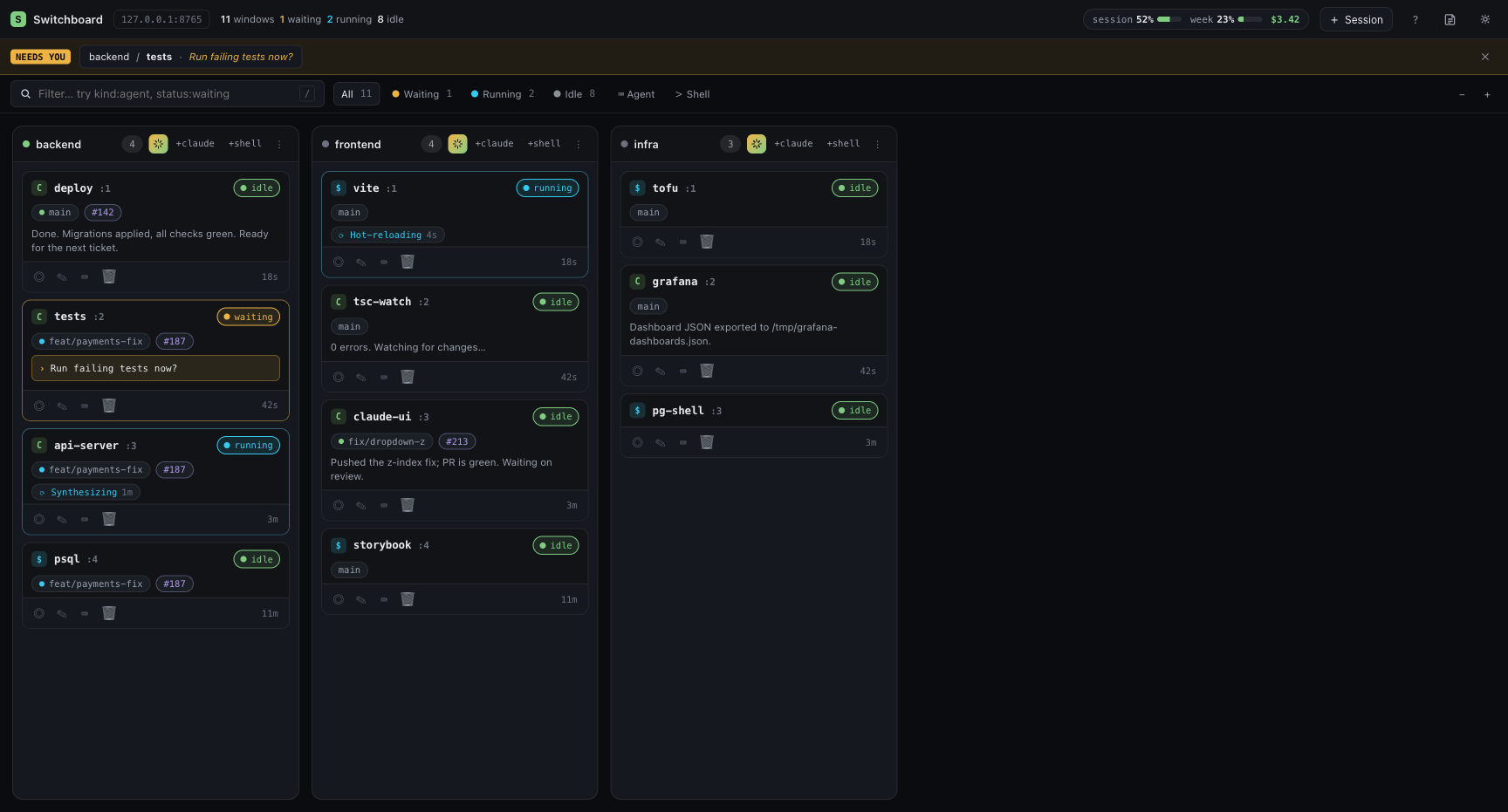
The cards do not just show the pane title. For panes running Claude Code, Switchboard scrapes the rendered TUI and surfaces:
- the current spinner label and elapsed duration if the agent is working,
- the most recent pending question (with the menu choices if it is an arrow-key menu),
- the last assistant “recap” line,
- the git branch and open PR for the worktree,
- the latest CI status for that branch,
- the context-window percent and per-session dollar cost reported by Claude Code.
That last set is where the project stopped being a weekend toy. Parsing a TUI that was never meant to be parsed turns out to be a surprisingly deep little problem, and I will spend most of this post on it.
Architecture
The shape is conventional and the pieces are small.
backend/                    FastAPI + libtmux, async WebSocket
frontend/                   React 18 + TypeScript + Vite + xterm.js
scripts/dev.sh              concurrent uvicorn + vite with hot reload
scripts/seed-tmux.sh        spins up a deterministic test fixture
The backend exposes a handful of REST endpoints (/api/state, /api/usage, action routes for send-keys, new-window, rename, …), one WebSocket per opened pane, and a separate AI rename endpoint that calls the Anthropic API to suggest a tmux window name from the recent pane content. The frontend polls /api/state on an adaptive cadence — fast when a modal is open, slow when the tab is hidden — and reuses the same WebSocket for both reading pane output and writing keystrokes.
The whole service is meant to run on 127.0.0.1 next to the user’s tmux server. There is no daemon to install, no socket file to manage; libtmux talks to whichever tmux socket the calling user already has.
Two niceties worth calling out
The kanban view is the front door, but two smaller features earn their keep every day.
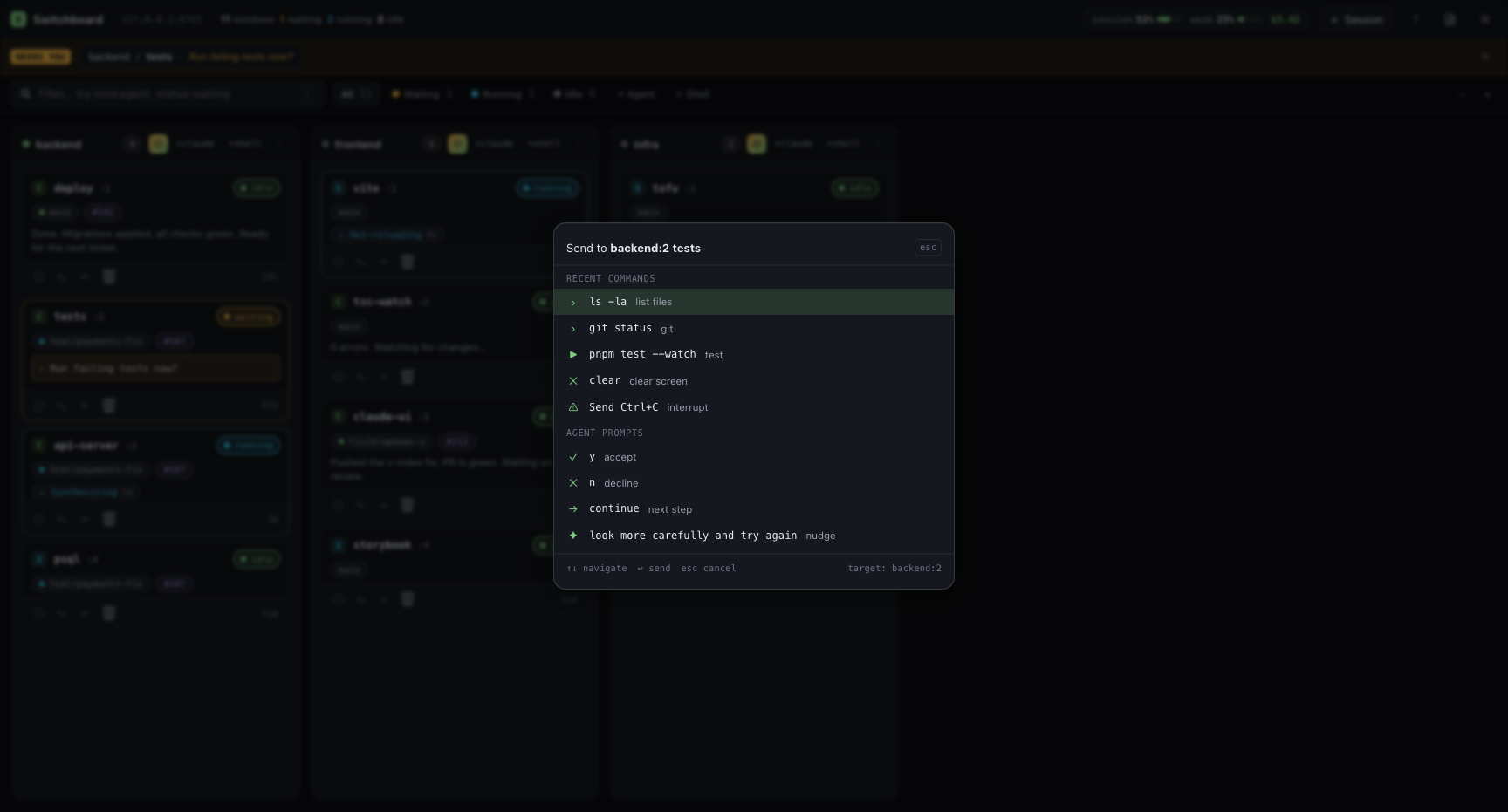
The ⌘K command palette is a send-keys quick action aimed at whichever agent most likely needs me. When I hit the shortcut, the palette opens pre-pointed at the first pane with a pending prompt — falling back to whichever card is highlighted, then to the first window. The body has two sections: a per-session history of commands I have sent before, and a small set of canned agent prompts — y, n, continue, and the one I lean on most, “look more carefully and try again”. Typing filters those by label; if nothing matches, hitting enter sends my literal query verbatim. The whole interaction takes under a second when the answer is obvious.
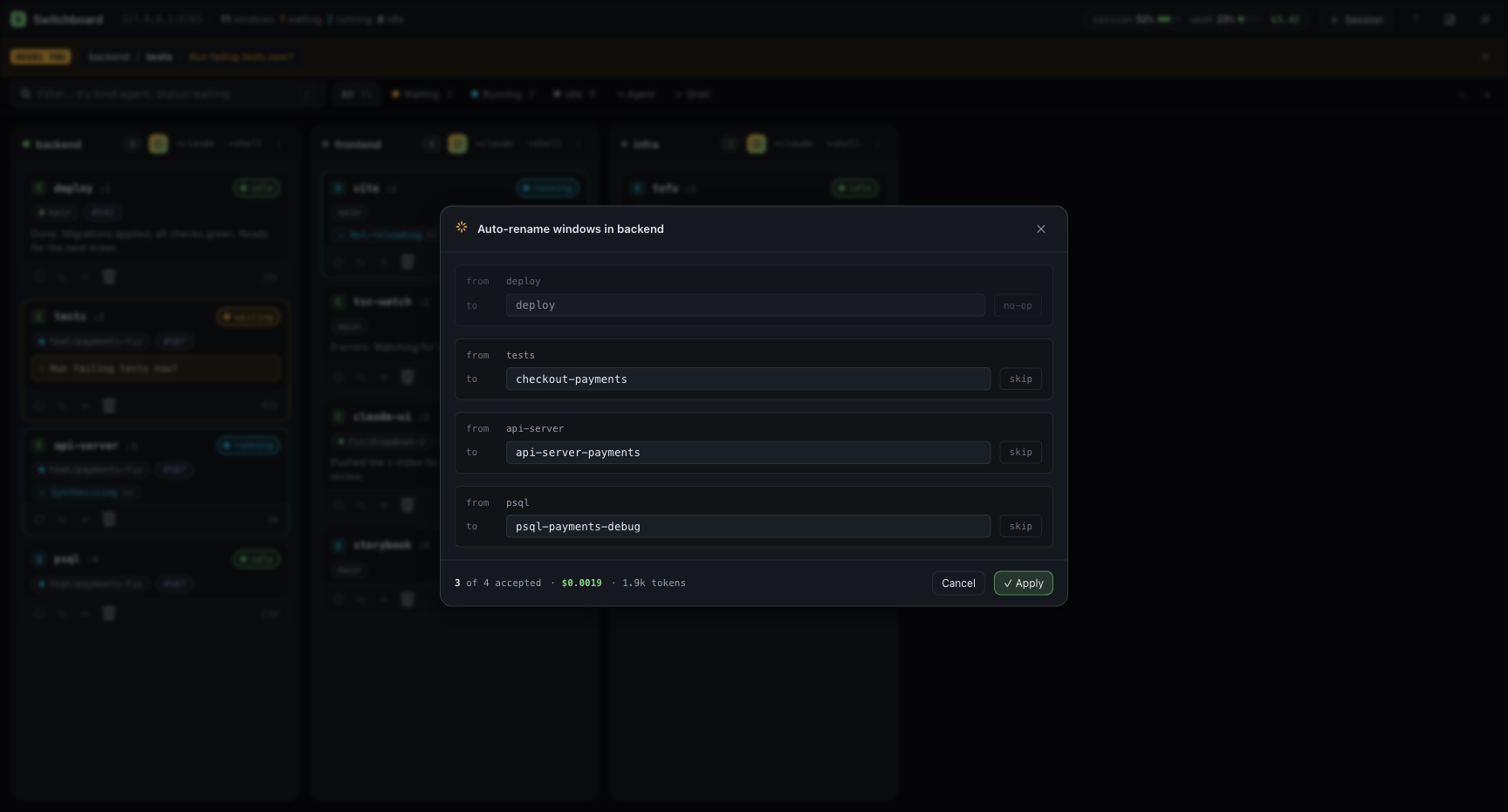
Auto-rename is the feature I expected to use once and never touch again, and instead I run it almost daily. Spawning seven worktrees for seven tickets leaves seven tmux windows named zsh, zsh, zsh, … A small Anthropic Haiku call per window reads the last ~80 lines of pane scrollback and proposes a short, descriptive name. The UI lays them out in a table; each row has the suggested name editable inline with accept/skip controls so I can veto bad suggestions before they hit tmux rename-window.
Parsing a Claude Code pane
Claude Code’s TUI is a moving target. Glyphs change between builds, the spinner cycles through a whimsical set of verbs (Kneading, Asking, Wandering), the status bar has had three different shapes in the last six months, and there is no programmatic interface. The only stable surface is what tmux sees: the captured pane buffer, with all the ANSI sequences stripped.
I started with a verb allowlist — match Thinking, Reading, and so on — and the parser broke roughly every other release. The trick that finally stuck was to stop matching the verb and start matching the shape.
Spinners
Every active Claude Code spinner line has the same skeleton: one of a small set of glyphs at the start, a label of arbitrary text, and a parenthesized payload at the end that holds the elapsed duration and token counters.
_BRAIL_GLYPHS = "⠋⠙⠹⠸⠼⠴⠦⠧⠇⠏⡿⣟⣯⣷⣾⣽⣻⢿"
_SPINNER_GLYPHS = f"{_BRAIL_GLYPHS}✻●✽✶✷✸✺✼·"
_SPINNER_RE = re.compile(rf"^\s*[{_SPINNER_GLYPHS}][\s ]+(.+?)\s*$")
_SPINNER_PAYLOAD_RE = re.compile(r"\(([^)]+)\)")
The line is only treated as “actively running” if both halves are present. That single rule fixed a whole family of false positives — a line like ● Done. matches the spinner glyph but has no parenthesized payload, so it correctly stays out of the running bucket. A line like ✻ Churned for 14s matches the glyph and has parentheses-like prose, but the payload extractor looks for a (...) group, so it is also rejected. The shape carries the meaning; the verb does not.
Pending input
The detector for “this pane is waiting on me” is gated on three patterns appearing in the last twenty-five lines, with no spinner running:
- an arrow-key menu (numbered choices led by a
❯or>cursor), - a
(y/n)or[y/n]marker anchored to the end of a line, - a
press enter/continue?prose marker.
The end-of-line anchor on the y/n patterns matters more than it looks. Without it, any sentence that mentioned [Y/n] in passing — a recap describing the prompt feature itself, for instance — would flip the card into the “needs input” column. The fix was a lookahead allowing only whitespace or box-drawing characters after the marker:
_YN_PATTERNS = [
    re.compile(r"\(\s*y\s*/\s*n[a-z/?]*\)(?=[\s│|┃▏╎]*$)", re.IGNORECASE),
    re.compile(r"\[\s*y\s*/\s*n[a-z/?]*\](?=[\s│|┃▏╎]*$)", re.IGNORECASE),
]
The same theme recurs across the parser: TUI prose is full of things that look like signals but are not, and the cure is almost always a tighter anchor rather than a smarter classifier.
Context window and cost
Three phrasings have appeared across Claude Code builds for the context-window indicator:
🧠 █░░░░░░░░░ 16%
Context: 73% (~144k / 200k tokens)
(200k context window used: 73%)
The scanner walks the last thirty lines bottom-up and tries each pattern in turn. Bottom-up matters because a stale Context: line that scrolled off the visible TUI should never beat a fresh one further down. Values outside 0..100 are dropped — they almost always indicate the scanner caught a mid-redraw frame.
The per-session cost lives in a status line that looks roughly like:
📨 6 📤 542 | session: 155.4k in / 542 out 💰 $8.33 🤖 opus …
A single regex anchored on the 💰 emoji pulls the float out:
_SESSION_COST_RE = re.compile(r"\U0001F4B0\s*\$([\d,]+(?:\.\d+)?)")
The frontend sums those values across visible Claude panes to drive the “today’s spend” pill in the header. It is the cheapest piece of code in the parser and the one I look at most often.
Recap, branch, PR
The last assistant message is taken from the most recent line beginning with one of ●, ⏺, ✻, ✓, or ✗ — modern Claude Code uses ⏺ (U+23FA) where older builds drew ● (U+25CF). Branch and PR are best-effort git and gh shells run in the pane’s current working directory, with a 30-second cache so a dashboard refresh does not fork-bomb your laptop.
The whole parser fits in one file, under 600 lines, and is the only place where Claude-Code-specific knowledge lives. Everything else in the backend talks about panes, not agents.
Streaming a live terminal to the browser
The other half of Switchboard is the terminal modal. When the user clicks a card, the frontend opens a WebSocket and an xterm.js instance; everything from there flows over a single duplex pipe.
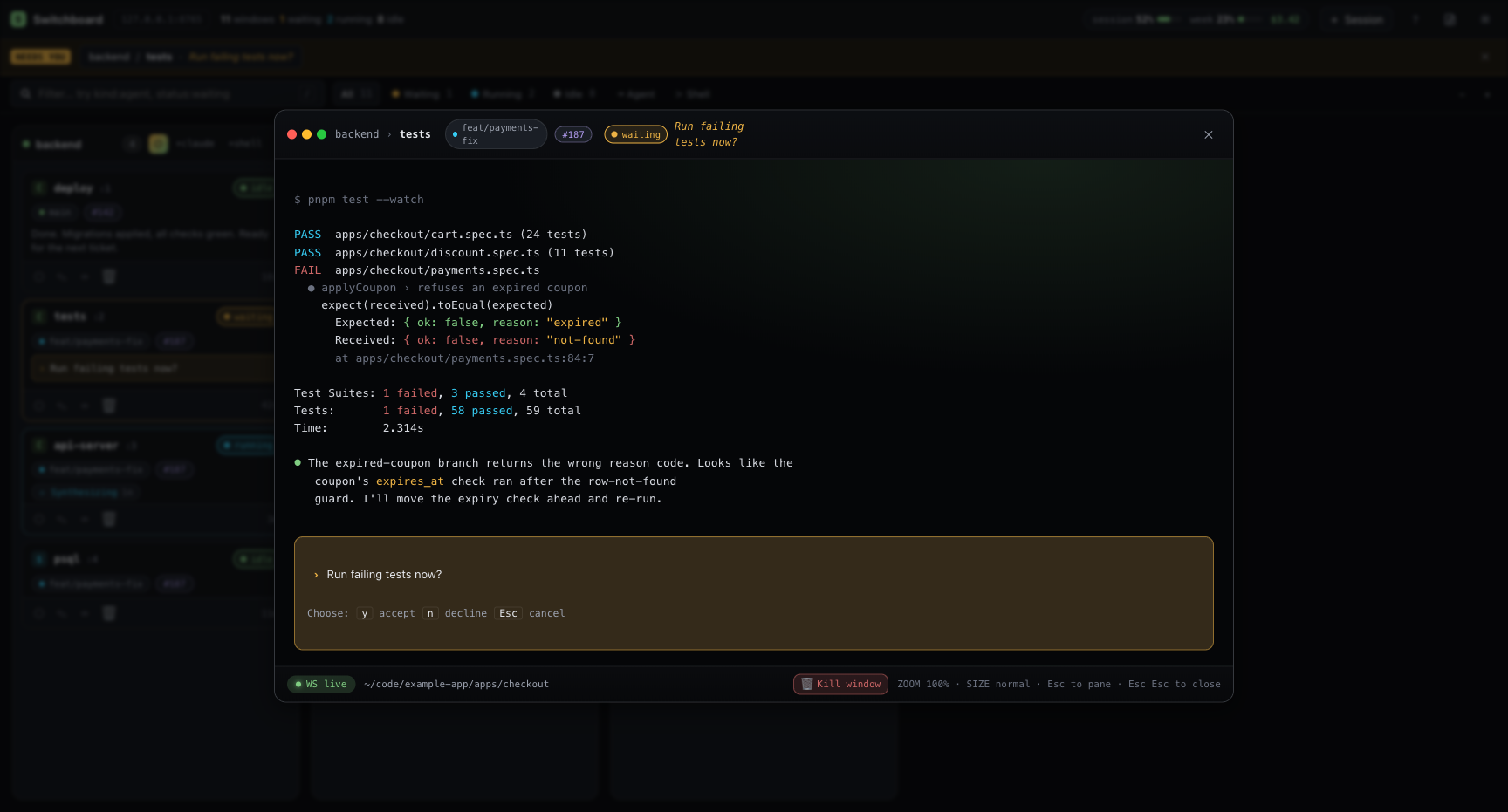
The naive approach is to poll tmux capture-pane on a timer and patch the differences into xterm — but capture-pane strips the very ANSI sequences xterm needs to render colour, cursor moves, and so on. The right primitive is tmux pipe-pane:
tmux pipe-pane -O -t TARGET 'cat > /tmp/sb-pane-<pid>-<uuid>.fifo'
pipe-pane mirrors the pane’s raw output stream — escapes and all — into a FIFO of our choosing. The backend opens the FIFO non-blocking, hands each chunk to the WebSocket, and xterm.js renders it natively. End-to-end latency is well under fifty milliseconds in practice, which makes the modal feel like a real terminal rather than a screenshot that updates.
Two subtleties earned their own comment block in the source.
FIFO naming and crash recovery. FIFOs are named sb-pane-<pid>-<uuid>.fifo. The PID scope is what makes the orphan sweep safe under uvicorn --workers >1: each worker only ever unlinks FIFOs whose PID matches its own. The startup sweep handles SIGKILL cases where an atexit hook never ran; the atexit hook handles the clean SIGTERM path. Either way, the temp directory stays bounded.
Screen-title pollution. With TERM=screen-256color (the default inside tmux), oh-my-zsh’s termsupport emits ESC k <title> ESC \\ sequences every command. A real tmux client intercepts and consumes these; pipe-pane does not, so they reach xterm.js. xterm’s parser does not recognise ESC k, drops the ESC, and renders the title bytes as printable text on the current row — so ls -al shows up as lstotal 272. The fix is a small streaming state machine that holds back any partial ESC k … sequence between chunks and discards it on terminator, leaving every other escape untouched. About forty lines of code, and the kind of bug you only find by squinting at corrupted output for an hour.
Security model
A service that can read your panes and inject keystrokes is, for practical purposes, a remote shell. I wanted the defaults to be safe enough that I would not have to think about it, and the escape hatch to be obvious when I did.
Loopback mode (default). Bound to 127.0.0.1, so only processes on the host can reach the port. No token, no friction. Two protections still apply:
- the
Hostheader must match a loopback allowlist, which defeats DNS-rebinding attacks from a malicious page in a logged-in browser, - mutating requests need a double-submit CSRF cookie+header, so a cross-origin POST cannot drive the API even if the browser allows the request to leave.
Exposed mode. Binding to any non-loopback host (SWITCHBOARD_HOST=0.0.0.0, a LAN IP, …) flips authentication on automatically. A random token is generated on first run and stored at ~/.switchboard/token with mode 0600. The startup log prints a bootstrap URL — http://host:port/?token=… — that is opened once; the backend swaps the token for an HttpOnly session cookie and the URL is no longer needed. API clients can still use Authorization: Bearer <token> if they prefer.
The auto-detection can be overridden either way with SWITCHBOARD_AUTH_REQUIRED=true|false, and POST /api/auth/regenerate rotates the token, invalidating any outstanding session cookies. The whole thing is small enough to audit in an afternoon.
Operational details
A handful of decisions are worth calling out because they are not the obvious ones.
Single-flight state collection. /api/state runs a full pass over every tmux window, calling capture-pane and a couple of git/gh shells for each pane. When the user opens a modal, the frontend polls more aggressively, and on a beefy session that polling used to spawn enough concurrent subprocesses to hit OSError [Errno 24]: too many open files. The fix is a single-flight slot: while a scan is in flight, additional callers await the same Future rather than launching their own. Peak FD usage is bounded by one scan regardless of poll rate.
Adaptive prompt polling. The pane-watch loop uses a two-speed cadence: 150 ms while a prompt is on screen (so arrow-key highlights track live) and 1 s otherwise (just watching for one to appear). Most panes spend most of their life in the slow mode.
Plan-usage scraping. The header surfaces a “% of plan used” pill, derived from a headless claude /usage invocation in a throwaway tmux session. The scraper is cached, prewarmed on startup, and the orphan sessions are swept exactly the way the FIFOs are.
Pre-push hook. The repo ships a hook at scripts/hooks/pre-push that runs the same gates as CI — ruff format/check, ty, pytest, tsc, vite build — before any push. git config core.hooksPath scripts/hooks opts in. It catches the boring class of regression (a missing import, a type drift) before the round-trip to CI, which on a one-developer project is most of them.
Where it goes from here
Switchboard started as scaffolding for my own workflow and ended up being the tool I open before my editor in the morning. It has shifted how I think about parallel agent work: instead of “I am babysitting Claude,” it is closer to “I am triaging a small team.” Three things I want to tackle next:
- Multi-host. Today the backend assumes the tmux server is local. A “remote runner” mode that connects to a tmux socket over SSH would let me run agents on a beefier machine while keeping the dashboard on my laptop.
- Notification rules. A simple rules engine — “ping me when this worktree’s CI turns red” or “ping me on any pending input older than five minutes” — instead of the all-or-nothing browser toast I have today.
- Better recap surfacing. The last-line recap is useful but coarse. I would like a small structured summary per agent (“opened PR #43, two tests failing”), probably generated by a small Anthropic call on demand rather than parsed out of the TUI.
The code lives at github.com/tdody/switchboard under the MIT license. ./scripts/dev.sh is the whole getting-started flow; ./scripts/seed-tmux.sh spins up a deterministic fixture if you want to poke at the UI without burning a real session. Issues and PRs welcome — especially if you have a Claude Code build whose status line my parser does not recognise yet.